
CALI v2 Lightroom Presets
Premium Luts40% OFFNEW

CALI v2 Lightroom Presets

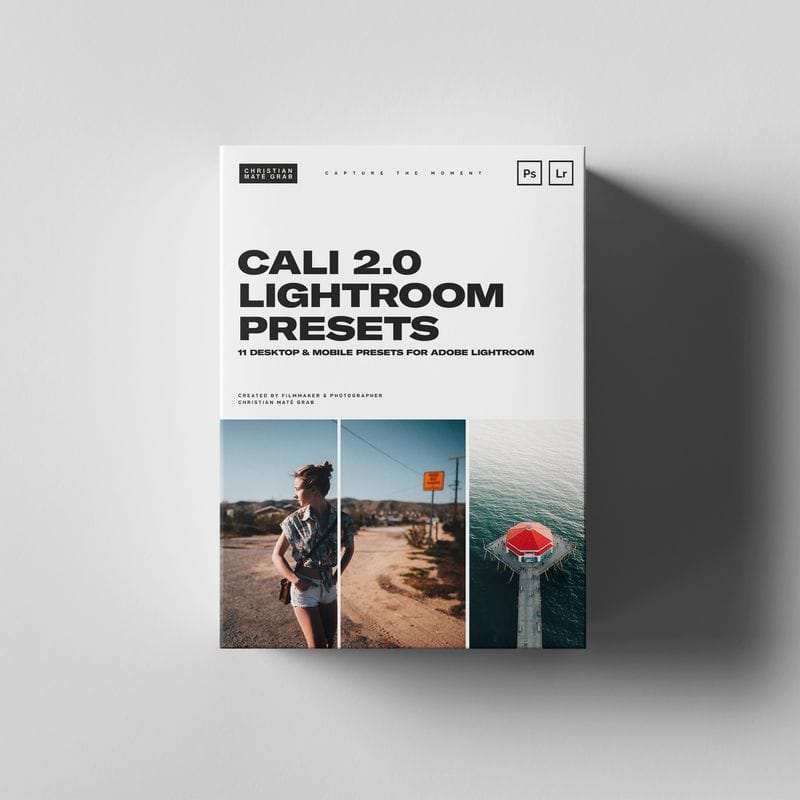
CALI v2 Lightroom Presets - CALI 2.0 | 11 Lightroom Presets for Mobile & DesktopMy best Lightroom Presets from our trip to California in March 2019 that give you rich, saturated and film-like colors for Lightroom Desktop & Mobile (free App) - Works with every camera brand and model.WHAT YOU GET+ 11 Lightroom Desktop Presets+ 11 Lightroom Mobile Presets+ Bonus LUT for grading your Videos+ Tutorial for Mobile Installation
$9.00$15.00
Instant Download
LIFETIME ACCESS
Secure Payment
Guaranteed Safe & Secure Checkout We accept PayPal, Apple Pay, Google Pay, Visa, Mastercard, Maestro and Amex
Share

CALI v2 Lightroom Presets

CALI 2.0 | 11 Lightroom Presets for Mobile & Desktop

Transform your photography with our exclusive CALI 2.0 Lightroom Presets, inspired by the vibrant colors and stunning landscapes of California from our trip in March 2019. Designed to provide rich, saturated, and film-like colors, these presets are compatible with all camera brands and models and can be used on both Lightroom Desktop and Mobile (free app).

What You Get:

  • 11 Lightroom Desktop Presets: Enhance your desktop workflow with these versatile presets.
  • 11 Lightroom Mobile Presets: Perfect for editing on the go, compatible with the app's free version.
  • Bonus LUT: Elevate your video projects with our specially designed LUT for color grading.
  • Installation Tutorial: Step-by-step guide for easy installation on mobile.

Tips for Best Results:

To achieve optimal results with the CALI 2.0 presets, consider adjusting the following settings in Lightroom:

  • Exposure: Tailor the exposure to fit the lighting conditions of your images.
  • Temperature: Modify for a cooler or warmer tint depending on your desired mood.
  • Contrast: Adjust to enhance depth and dynamic range in your photos.

Also, be sure to adjust the profile settings in Lightroom to match your specific camera model for the best effect.

Also, be sure to adjust the profile settings in Lightroom to match your specific camera model for the best effect.

Installation Instructions:

For Lightroom Desktop:

  1. Open Lightroom and go to Lightroom Preferences (ensure it is NOT Catalog Preferences).
  2. Uncheck the option: Store preset with this catalog.
  3. Locate the Camera Raw Settings folder:
    • Mac~/Library/Application Support/Adobe/CameraRaw/Settings
    • WindowsC:ProgramDataAdobeCameraRawSettings
  4. Alternatively, open Lightroom CC (make sure it's updated):
    • Go to Lightroom Preferences.
    • Click on the Preset section and then Show Lightroom Presets Folder.
    • Navigate to the Camera Raw folder, then open Settings.
  5. Copy your .xmp preset files into the Settings folder.
  6. Restart Lightroom or Photoshop and the presets will be available for use.

For Lightroom Mobile:

  1. Download the presets and ensure they are saved on your mobile device.
  2. Follow the instructions in your tutorial to install the presets using the Lightroom mobile app.

Important Note:

Due to the digital nature of this product, there are no refunds or exchanges once purchased. Please ensure you're satisfied with your choice before completing your order.

Dive into the world of vibrant photography with CALI 2.0 presets and give your images that stunning, cinematic quality they deserve!

Hottest Deal

Membership Packages

Fixed-term passes with unlimited downloads — Brozen, VIP Gold & Diamond.

Starting at $229.00

View All Plans

Original Product

100% Original products recommended by Filmmakers.

Fast Download

Get fast direct download link automatically after payment received

Affordable! Bargain!

Discount up to 90% off for most products purchase!

100% Secure

Your payments are secure with our private security network.

© 2019–2026 LUTsPresets. All rights reserved.

100% Secure
Accepted payment methods: PayPal, Apple Pay, Google Pay, Visa, Mastercard, Maestro and Amex